 Muffle
Mute your Mac's mic from anywhere.
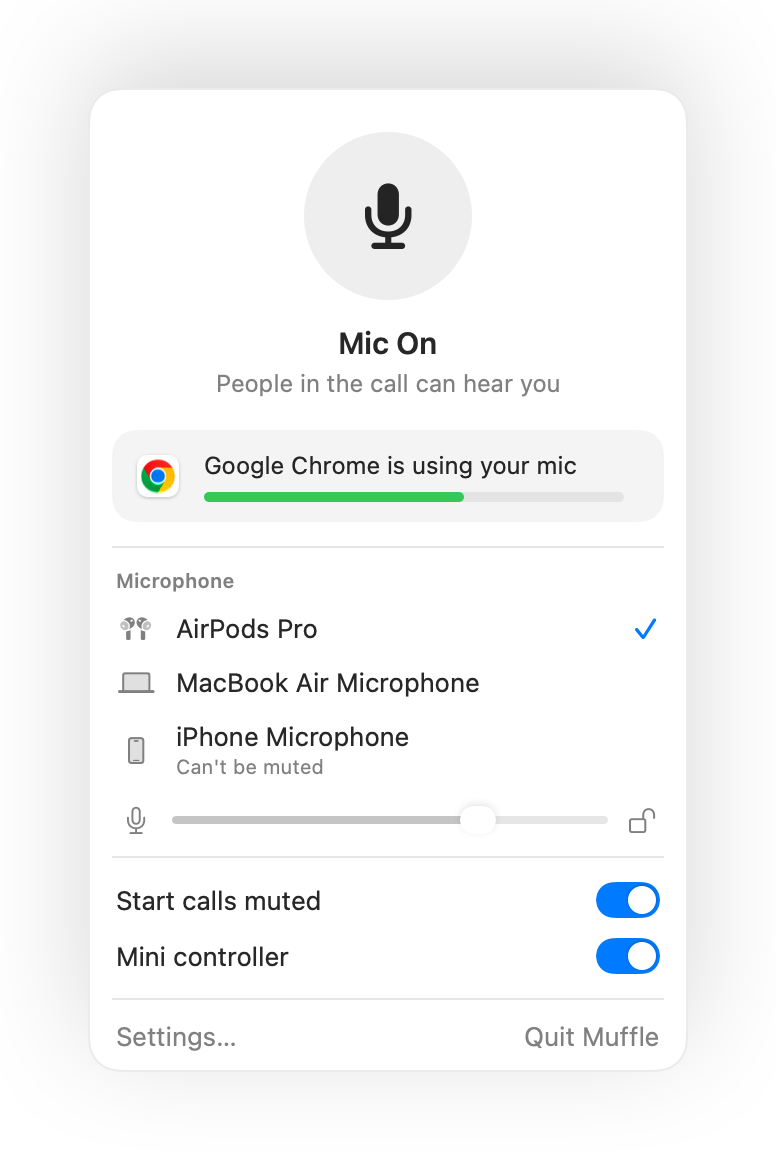
Press your AirPods or one keyboard shortcut. Muffle turns the microphone itself off, so Google Meet, Zoom, Teams, Slack and every other app hear silence.
Free for 3 days. Then one payment, no subscription. For macOS 14 Sonoma and later.
Works with every app that uses your mic
- Google Meet
- Zoom
- Microsoft Teams
- Slack
- Discord
- FaceTime
- Webex
- Skype
- SoWork
- Gather
- Chrome
- Safari
- Arc
- Edge
- Firefox
Muffle mutes the microphone at the hardware level, so it doesn't matter which app, browser or tab is using it.
Everything your Mac should do in a call
Press your AirPods to mute
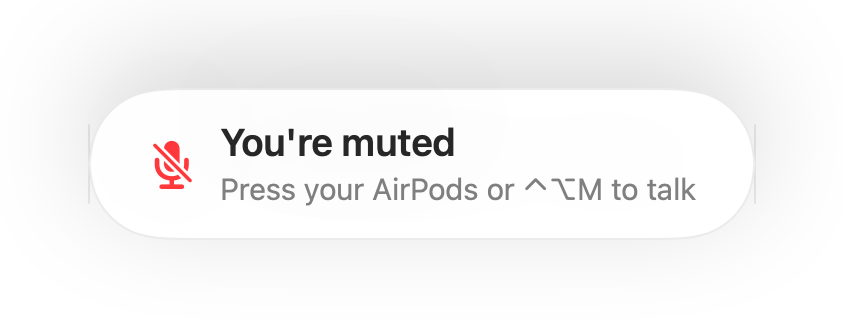
During any call, press the stem once to mute and again to unmute. It even works in Chrome, where Google Meet and other web calls ignore the AirPods press.
One shortcut for every app
Control-Option-M mutes you everywhere, even when the call is in a background tab. Hold it to talk while muted, let go to mute again.
A “You're muted” reminder
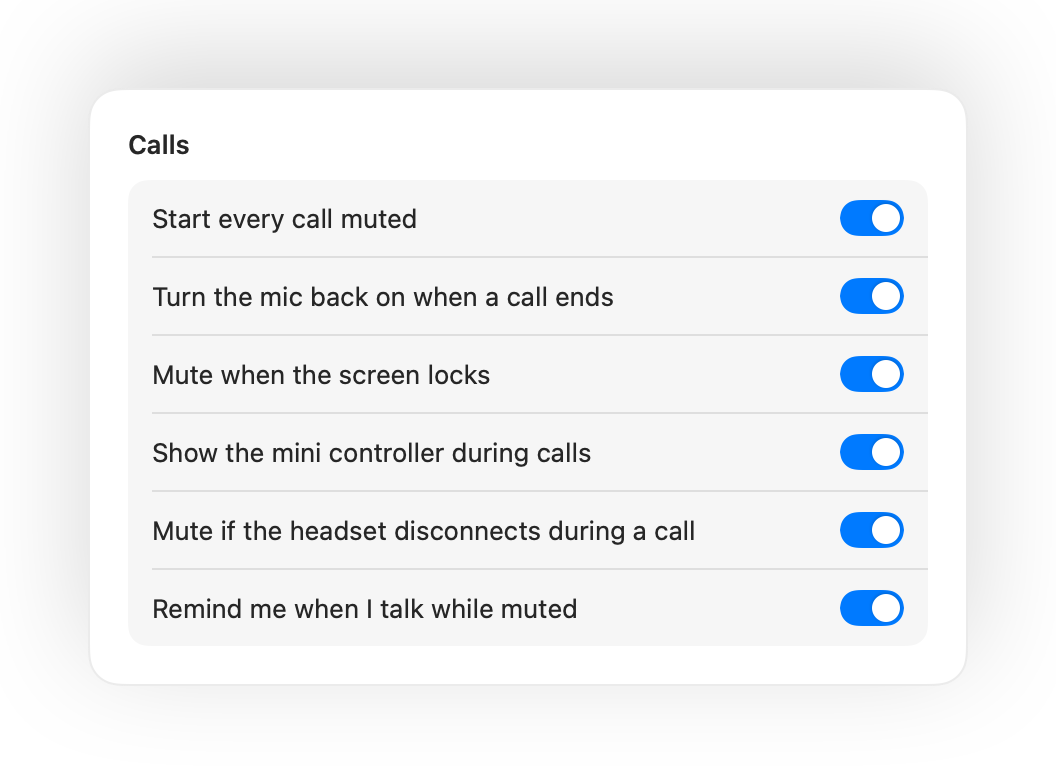
Start talking while muted and Muffle tells you, before you explain your whole idea to nobody.
Calls on autopilot
Start every call muted, turn the mic back on when a call ends, and mute whenever you lock your Mac.
Always know if you're live
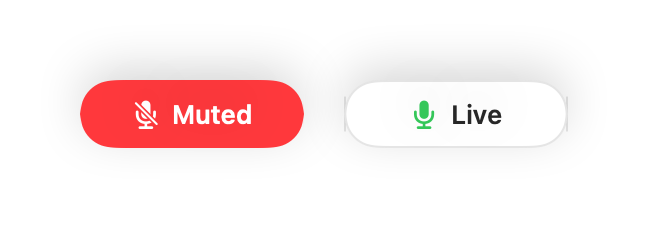
A small floating button shows your mic state during calls. Click it to mute or unmute.
Your mic level stays put
Chrome, Zoom and Teams change your mic level on their own. Lock it and Muffle puts it back.
Safe when your AirPods die
If your headset disconnects mid-call, Muffle mutes before the call switches to your Mac's mic and sends the whole room.
Shortcuts and Control Center
Mute from the Shortcuts app, Siri, a Stream Deck, Raycast, or a button in Control Center.
Push to talk or push to mute
Choose how your shortcut works: tap to toggle, hold to talk, or hold to mute for a cough. Add separate mute and unmute keys, or hold one key like Right Option or an extra mouse button.
Muted again when you go quiet
Unmuted to say one thing? If you then stay quiet for the time you pick, Muffle mutes you again.
The best mic for the room
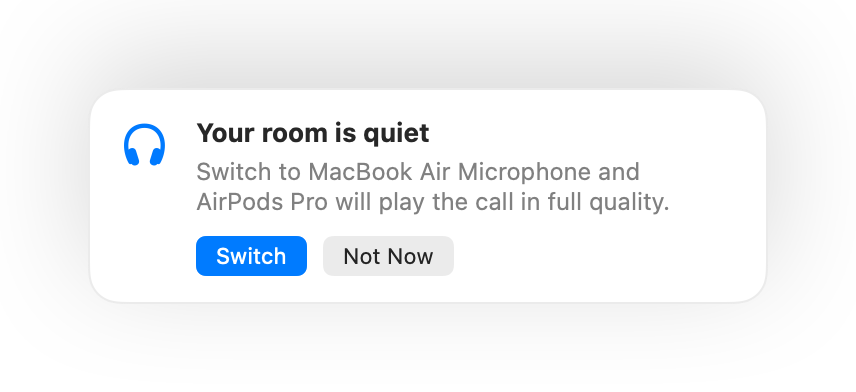
With AirPods in a quiet room, Muffle suggests your Mac's mic so the AirPods play the call in full quality. When it gets loud, it suggests the AirPods mic.
Impossible to miss
A green or red glow around the screen, a colored menu bar icon, a sound and a floating button. Turn on the ones you like.
Set up in a minute
- Install Muffle from the Mac App Store and allow microphone access.
- Join a call in any app, as usual.
- Press your AirPods, press Control-Option-M, or click the menu bar icon to mute.
Private by design
Muffle never records, stores or sends audio. It only switches your microphone on and off and reads its loudness. No accounts, no analytics, no tracking.
Questions
Does Muffle work with Google Meet in Chrome?
Yes. Chrome doesn't pass the AirPods mute press to web calls, so Muffle takes it and mutes the microphone itself. The same goes for any call in a browser tab.
Will other people see me as muted?
Your call app may still show your mic as on, because Muffle switches off the microphone rather than the app's button. People hear silence either way. The Muffle icon in the menu bar turns red while you're muted.
Which AirPods work?
AirPods Pro, AirPods 3 and later, and AirPods Max, plus Beats models with call controls. The keyboard shortcut and the menu bar work with any microphone.
Does it work with Zoom, Teams, Slack and Discord?
Yes. Muffle works with every app on your Mac that uses the microphone, desktop apps and browser calls alike.
Is there a subscription?
No. Try every feature free for 3 days, then unlock Muffle with a single purchase.
Why does Muffle need microphone access?
macOS only passes the AirPods press to apps that are using the microphone, so Muffle keeps a silent connection open during calls. Nothing is recorded.
What happens if I quit Muffle while muted?
Muffle turns your microphone back on when it quits, so you're never stuck silent.
Which macOS versions are supported?
macOS 14 Sonoma and later. The Control Center button needs macOS 26 or later.
Does Muffle have push to talk?
Yes. Choose Push to talk in Settings and hold your shortcut to speak. You can also hold a single key like Right Option or fn, or an extra mouse button.
Why do my AirPods sound worse during calls?
When a call uses the AirPods mic, the AirPods switch to call mode, which plays sound in lower quality. In a quiet room Muffle suggests your Mac's mic instead, so the AirPods keep playing in full quality.
Guides
- How to mute Google Meet with AirPods on a MacThe AirPods press doesn't mute Google Meet in Chrome on a Mac. Here's how to mute Meet with your AirPods, a shortcut or the menu bar, in any tab.
- How to mute Zoom with AirPods or a shortcut on a MacMute Zoom on your Mac with an AirPods press or one global shortcut, even when Zoom isn't the active window. Works in the Zoom app and in the browser.
- How to mute Microsoft Teams with AirPods on a MacMute Microsoft Teams on your Mac with your AirPods, a global shortcut or the menu bar. Works in the Teams app and in Teams in the browser.
- How to mute a Slack huddle from any app on a MacMute Slack huddles on your Mac from any app with one global shortcut or your AirPods. No need to find the huddle window.
- Push to talk and a global mute shortcut for Discord on a MacUse one global push to talk and mute shortcut for Discord on your Mac, or mute with your AirPods. Works in the Discord app and in the browser.
- How to mute Webex from any app on a MacMute Webex meetings on your Mac with one global shortcut or your AirPods, even when Webex isn't the active window.
Short, practical answers for muting your microphone on a Mac, in every app.
Stop hunting for the mute button.
Muffle is free to try for 3 days.
Coming soon to the Mac App Store